
Data Migration
-
NEW/CHANGE: Data type and constraints definition - changes to how these are input and modified in the product UI. This is a non breaking change. Below shows the new UI (1.1.936)
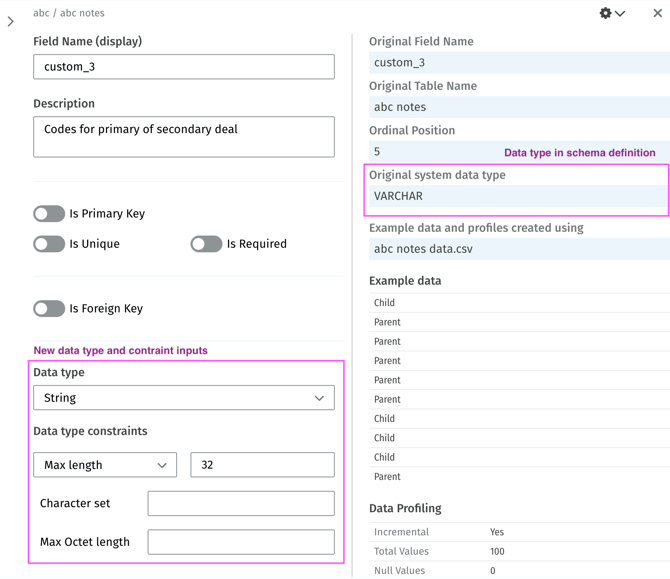
- This affects schema field definition and uses the new schema definition.
- Data types and data type constraints are now explicitly defined rather than input in the shorthand style (eg: DECIMAL(18,2)) in the 'System data type' input.
- The supported (internal to Zengines) data type list is fundamentally the same. This was previous known as 'Logical data type' and will be mapped with any existing constraints to the new 'Data type' and appropriate constraint.
- The previous input 'System data type' has been removed.
- Any data type defined in the schema will be stored and displayed in the non editable field 'Original system data type'. That value and the constraints associated with the field are used to determine the working 'Data type' for the field, which the user may change. Example:
- In the schema definition is has 'TEXT' for the DATA_TYPE and the value 4 for the CHARACTER_MAXIMUM_LENGTH. This will result in the following in Zengines:
- Data type:
String - Data type constraints:
Fixed length, 4 - Display shorthand:
CHAR(4)which is shown in the 'Data Type Constraint' column in the schema/field grid, and in the Mapping screens.
- Data type:
- In the schema definition is has 'TEXT' for the DATA_TYPE and the value 4 for the CHARACTER_MAXIMUM_LENGTH. This will result in the following in Zengines:
- This fixes existing an issue where changes to 'System data type' were not reflected in underlying data type for the field definition.
- Addition column level constraint options have been added, they are: is UNIQUE and FOREIGN_KEY, these supplement the existing is REQUIRED, is PRIMARY_KEY
- If a is FOREIGN_KEY is on, the reference table and reference field can be inputted, these are not currently synced to the schema, but simple text references.
- NEW: data validation (schema conformity)
- Data files when associated with a schema/table can be validated against the schema/table/fields definition. This checks each value in the row and column against the fields definition for Data type, Data type constraints, Required and Primary key, then generates a report.
- The report summarizes the compliancy for each field in the table, and a granular field and row level pass/fail report is also available to download. This contains the row ID and 0 (passed), 1 (failed) scores for each value from the original data file.
- Currently data files may only be validated once per table association.
-
NEW: Schema definition files can now be used to add tables to an existing schema. Choosing a schema definition file rather than a data file in the 'Add tables to schema' flow will add any tables found in the schema definition file that are not already in the Source or Target.
-
NEW: Rule generator prompt is now included in the custom transformation - If a user creates a custom transformation using the Rule Generator, the prompt used will be inserted as a comment in the rule. This will not be kept synced and any subsequent edits (unless fresh prompts) will not be reflected in the comment.
Minor updates and bug fixes
- Issue fixed where batch assigning matches on the Mapping grid would only assign 3 star matches.
Data Lineage
- AI Lineage Assistant - performance and response improvements.
Utilities
- Data Files: Split CSV into smaller chunks - take a larger file and split into chunks by rows.
- Platform: Update data type constraints (report) - BETA
Platform updates
None.